
Nickname
Nickname tracking allows you to have any channel's subscriber count displayed next to your name in servers.

Start tracking
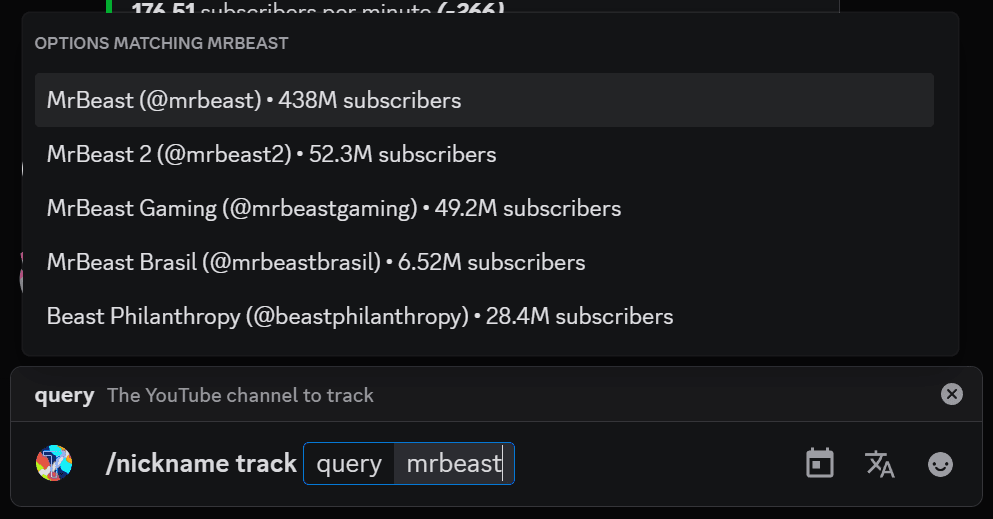
To start tracking a YouTube channel in your nickname, run /nickname track. You can select a channel by either typing its name and selecting it among the options, or by specifying its channel ID.
Keep in mind that you can only track one channel at a time.
Stop tracking
To stop tracking any YouTube channel in your nickname, run /nickname untrack. It will stop tracking the channel, and removes it from your nickname.
FAQ
Why does Tracky say it's not allowed to change my nickname?
There's two possible cases as to why Tracky cannot change your nickname.
Server owner
Due to limiations with Discord, Tracky (nor any other user in a server) cannot change the nickname of the server owner, no matter how high their roles are. Unfortunately, there is nothing we can do to circumvent this.
Normal member
If you are a normal member experiencing this issue, it either means that Tracky doesn't have the Manage Nicknames permission, or its role is below yours. Ask a server admin to move Tracky's role and give it the necessary permissions.